
Web development
Restaurant website: what it needs and what it costs
What a restaurant website needs (menu, bookings, allergens, opening hours, languages), what it costs in 2026 and when a Google Business Profile is enough.
- Published
- November 20, 2026
- Updated
- November 20, 2026
- Author
- Vitalii Shynkarenko
- ⏱
- 7 min
Before booking, many people look the restaurant up on their phone: the menu, the opening hours, how to get there and whether there is a table on Friday. If that information sits in a PDF nobody can read or on a site that takes ages to load, the table goes to the place next door.
This guide covers what a restaurant website needs, what EU rules say about allergens, what it costs and when you do not need a website at all.
The short version
- A restaurant website has three jobs: show the menu, give the practical details (hours, address, phone) and lead to a booking.
- Put the menu in text, not a PDF: it reads better on a phone, Google understands it and you can change it in a minute.
- If you sell takeaway or delivery from your site in the EU, allergen information must be available before the customer pays.
- With us, a simple restaurant website starts at €200 + VAT; a multi-page site starts at €500 + VAT.
- If you have one dining room, a well-kept Google profile and bookings already sorted, you may not need a website yet.
What a restaurant website is for today
Instagram, Google and delivery apps already show your restaurant. A website does not replace them. It does something else: it is the only place where you decide what people see, in what order and where every button leads.
On Instagram the menu gets lost between posts. On a delivery app you sit next to your competitors and pay a commission on every order. On your own site, the customer sees your menu, your photos and your booking button, with no distractions and no middleman.
That is why a good restaurant website is short and practical. It does not need five paragraphs on the history of the place. It needs to answer four questions fast: what is on the menu, what it costs, when you are open and how to book.
What a restaurant website needs
This is the checklist we use at the start of a project. Run it against your current site or the quote you have been sent:
| Item | Why it matters | Common mistake |
|---|---|---|
| Menu with prices | It is the first thing people look for | An 8 MB PDF that is unreadable on a phone |
| Opening hours and closing days | Saves wasted calls and trips | Summer hours still showing in December |
| Address with a map | People check it on their phone, often on the way | A picture of a map instead of a link that opens navigation |
| Tappable phone and WhatsApp | One tap and they are calling | The number shown as an image |
| Booking button always visible | It is the main action | A form hidden on the contact page |
| Allergens | The law requires it and customers appreciate it | “Ask our staff” as the only information for online orders |
| Real photos | Real dishes and the real room build trust | Stock photos that look nothing like the place |
| Languages | Visitors and locals | Machine translation that renders dish names however it likes |
| Groups and events | Usually the highest-value bookings | No way to ask for a quote for 20 people |
| Legal notice, privacy and cookies | Mandatory if you collect personal data | A cookie banner that covers the menu |
The menu: text, not PDF
A PDF feels convenient: export it from the design tool and upload it. But on a phone people have to zoom, scroll sideways and wait for it to load. Google reads a PDF less well than a page, so it is harder for someone searching for “seafood rice near the harbour” to find you.
A text menu with sections (starters, mains, desserts, wine) and prices reads well on any screen. And if the site has a simple admin panel, changing a price or removing a dish that has run out takes a minute, with no need to call anyone.
If you have a set lunch menu, put it on the home page and keep it current. It gives people a reason to come back to your site every week.
Bookings: button, form or system
There are three ways to handle bookings, from simplest to most complete:
- A button that calls or opens WhatsApp. No extra cost. Works well if the same person always takes bookings.
- A form on the site. The guest picks day, time and party size, and you get a notification by email, WhatsApp or Telegram. You confirm it. It is included in our packages.
- An external booking system (there are several built for restaurants). It shows real availability and confirms on its own. It has a monthly fee or a per-cover charge; check each provider’s terms. We connect it to the site with a button or embed it in the page.
The rule is the same for all three: the booking button must be visible on every page, on mobile too, without anyone having to look for it.
Allergens: what the rules say
In the EU, Regulation (EU) 1169/2011 (opens in a new tab) lists 14 allergens in Annex II that must be declared: cereals containing gluten, crustaceans, eggs, fish, peanuts, soybeans, milk, nuts, celery, mustard, sesame, sulphites, lupin and molluscs.
Each country sets out how this applies to food served unpackaged, as in a restaurant. In Spain, for example, Royal Decree 126/2015 (opens in a new tab) allows the information to be given verbally in the dining room, as long as it is provided when the customer asks, before the purchase ends, and is also recorded in writing on the premises (art. 6.5).
Distance selling is different. Under Article 14 of the Regulation, if you take takeaway or delivery orders through your website, the mandatory information, allergens included, must be available before the purchase is concluded and again at delivery. In practice, every dish in the online order should show its allergens, and “ask our staff” is not enough.
Takeaway orders without a per-order commission
Delivery apps bring new customers, but they charge on every order. In 2021, Spain’s competition authority, the CNMC, noted that the standard commission charged to restaurants “usually ranges between 15–35 % depending on the operator” (decision S/0026/20 (opens in a new tab), p. 10).
Many restaurants do both: they stay on the app to be discovered and invite people who already know them to order from the website for pickup. All that takes is a menu with a cart and online payment, which is what our store package includes. You run delivery yourself or keep it to pickup only.
Languages
In tourist cities, part of your audience does not read the local language. An English version of the menu and practical details is usually enough; in bilingual regions such as Catalonia, many locals appreciate their own language too. Three well-translated languages beat seven machine-translated ones.
Your website and your Google profile
When someone searches for “restaurant near me” or your name, the first thing they usually see is your Google Business Profile, with the map, reviews and hours. The website does not compete with the profile: it completes it.
Three things worth getting right:
- The same details everywhere. Name, address, phone and hours identical on the site, the profile and the apps. If they differ, customers do not know which to trust.
- The profile links to the website, and from there to the menu and booking, not to a generic home page.
- The site loads fast on mobile. People often look you up from the street on a weak connection. We measure speed before handover.
An example: Sobretaula, a demo project
To show how we handle all this, we built Sobretaula (opens in a new tab), a demo website for a fictional group of three restaurants in Barcelona. It is not a real client: it is a demo project (in Spanish) that you can open and try on your phone.
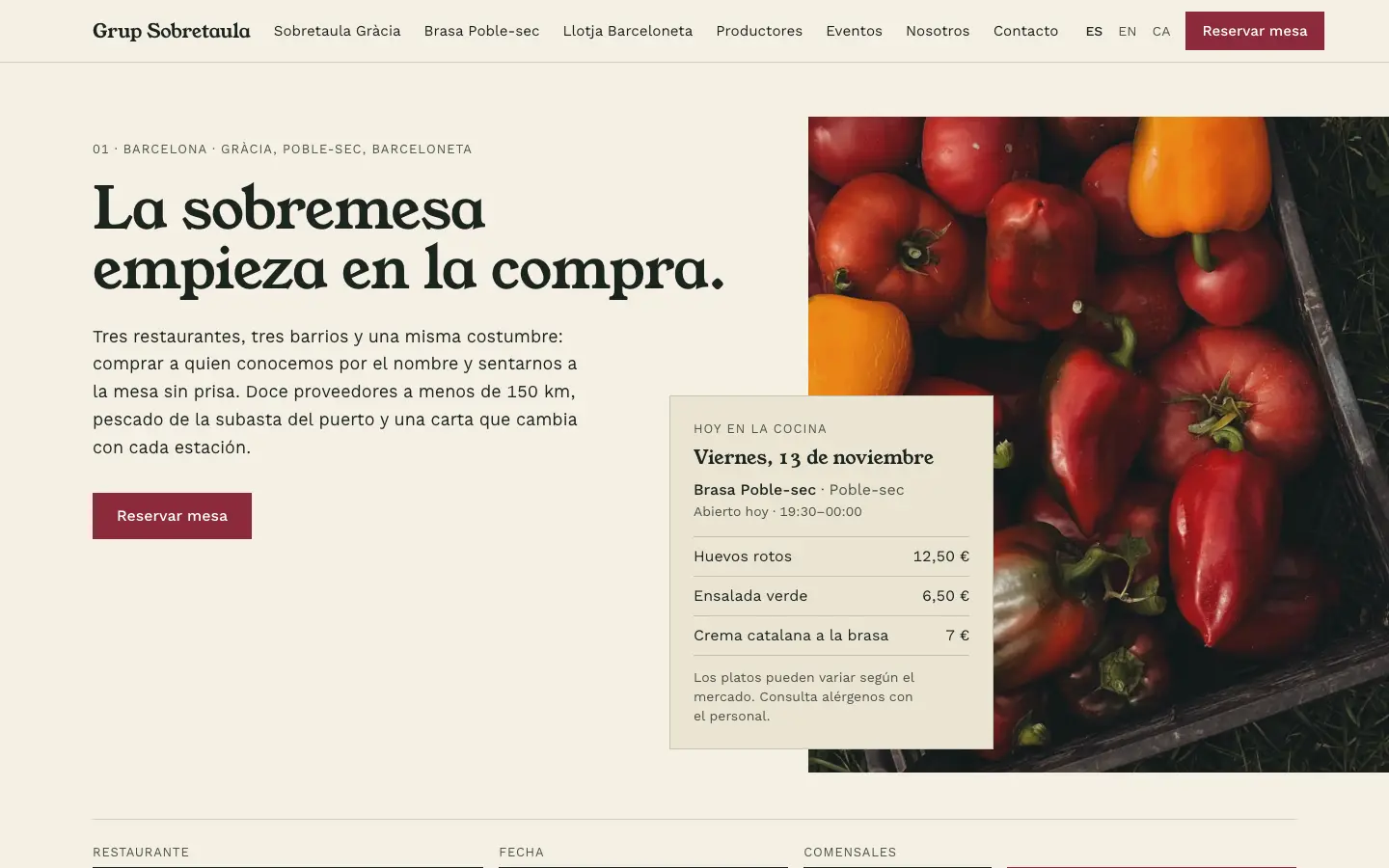
What you will see in the demo:
- The “book a table” button always sits at the top, in the menu, and again on the first screen.
- A “today in the kitchen” block with the venue open today, its hours and three dishes with prices. It is the web version of a daily specials board.
- One page per restaurant in the menu, so each venue has its own address, menu and hours.
- Three languages (Spanish, English and Catalan) with a visible switcher at the top right.
- A booking form right below: restaurant, date and party size.
How much a restaurant website costs
The price mainly depends on two things: how many pages you need and whether you sell online. These are the usual options:
| Option | Price | Who it suits |
|---|---|---|
| Template on Wix, Squarespace or similar | The platform’s monthly fee | You want to do it yourself and a standard design is fine |
| Custom landing page | €200 + VAT, 3 days | One venue: menu, hours, map and booking button on one page |
| Custom company website | €500 + VAT, 7 days | Up to 5 pages: menu, bookings, groups and events, contact, or one page per venue |
| Online store | €700 + VAT, up to 10 working days | Takeaway orders with a cart and online payment |
| Larger custom build | Fixed quote after a call | Many pages, special features or integration with your POS |
All our packages include custom design (no template), a mobile version, a form that notifies you by email, WhatsApp or Telegram, SSL, technical SEO and Google Search Console setup. You see the first design within 48 hours, and if it does not convince you, you pay nothing more. The code is yours from day one. Details are on web development and all prices together on pricing.
After launch, maintenance is optional: Basic at €29/month + VAT (hosting, domain, SSL, backups and small text changes, such as a menu price) or Full at €79/month + VAT (plus design changes, new sections and basic monthly SEO).
When comparing quotes, ask about the menu: can you change it yourself, is every change billed, and who pays for the booking system if there is an external one. Those are the lines that make two similar prices very different.
When you do not need a website
We build websites, so the easy answer would be that you always need one. You do not. You may not need one yet if:
- You run a neighbourhood bar with regulars and nobody asks about the menu before coming in.
- Your Google profile is complete and current: photos, hours, menu and phone. For many small places that is enough for a while.
- Bookings already work through an external system with its own page, and you do not sell takeaway.
- You will not keep it up to date. A site with the wrong hours or last year’s menu does more harm than no site.
If Wix or your Google profile is enough, we will tell you. A website starts paying off when you want direct bookings, groups and events, commission-free orders or to show up for searches like “restaurant for groups in the old town”.
What to prepare before you order one
- The menu as text
A document with dishes, prices and allergens. If it lives in a design tool, export it as text.
- Photos
Ten to fifteen real photos of dishes, the room and the team. If you do not have them, a few good ones beat lots of dark phone shots.
- Practical details
Opening hours (including summer hours and closures), address, phone, WhatsApp and links to social media and your Google profile.
- How you want to receive bookings
Phone call, form with notifications or an external system. If you already use one, the link or embed code.
- Languages
Which languages you need and who checks the menu translations.
Frequently asked questions
How much does a restaurant website cost?
With us, a one-page landing costs €200 + VAT and a site of up to 5 pages €500 + VAT. If you want takeaway orders with online payment, the store package costs €700 + VAT.
Can I change the menu myself?
Yes, if the site has an admin panel or the menu is in a format you can update. If you would rather not touch it, Basic maintenance (€29/month + VAT) includes small text changes such as prices or dishes.
Do I have to show allergens on my website?
In the EU, if you sell takeaway or delivery through the site, yes: allergen information must be available before the customer pays (Article 14 of Regulation (EU) 1169/2011). If the site only shows the menu, the rules do not require it, but it helps guests with allergies decide.
Do I need a paid booking system?
Not always. A form that notifies you by WhatsApp or email is included in our packages. An external system pays off when you have many tables, several sittings or several venues.
How long does it take?
A landing page in 3 working days, a site of up to 5 pages in 7 and an online store in at most 10. The clock starts once we have the menu and photos.
What if I do not like the design?
We show you a first design within 48 hours. You pay 50 % to start and the rest on delivery. If the first design does not convince you, we refund the deposit (terms in the contract).
Want to know what your restaurant’s website needs? Tell us on a 15-minute call (opens in a new tab). We will tell you which package fits, or whether your Google profile is enough for now. See also the Sobretaula (opens in a new tab) demo, our web development packages and all prices.
More on this on our site: Web development · Pricing.
01 — News
Related news
What web development is and what a real project includes
What web development means, the phases of a real project, what the price should include, and how to choose between a landing page, a company site and a store.
Ready-made website development packages 2026: from Start to Enterprise
An overview of typical website development packages in 2026 — from a basic Start to Enterprise solutions, and what's usually included at each level.
How much does a business website cost in 2026: full price breakdown
How much a website really costs in 2026 — from a landing page to a marketplace, and what affects the final price the most.
02 — Contact
Tell us what you need
We reply with a proposal.